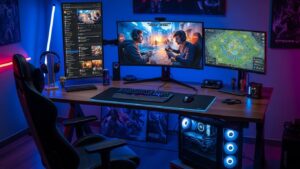
Streaming video games has evolved from a hobby to a full-blown career for many content creators around the world. Whether you’re aiming to entertain an audience, share your gaming skills, or simply enjoy the act of streaming, setting up a professional-quality stream is essential for creating an engaging experience. The good news is, with the right tools, knowledge, and approach, anyone can stream their games like a pro. Here’s a guide to help you navigate the essentials of game streaming, from hardware setup to growing your audience.
1. Choose the Right Streaming Platform
Before diving into the technical setup, you need to decide where to stream. There are several popular streaming platforms to consider, each with its unique community and features.
- Twitch is the leading platform for gamers, offering an interactive community and tools like stream alerts and integrations with other services.
- YouTube Gaming provides a massive audience base with the added benefit of video-on-demand (VOD) capabilities, so your streams can be watched long after the broadcast ends.
- Facebook Gaming has grown rapidly, offering an easier way to reach your friends and fans while integrating social features.
- Trovo and DLive are newer platforms, but they also offer opportunities for growth and a sense of community.
Choose the platform that best fits your style, goals, and audience, as each platform has specific tools and features that can help enhance your streaming experience.
2. Invest in the Right Hardware
A professional gaming stream requires quality hardware to ensure your stream is clear, smooth, and lag-free. Here’s a breakdown of the essential hardware components you’ll need:
- A Powerful PC or Console: If you’re streaming PC games, make sure your computer meets the requirements to run the game and the streaming software at the same time. A modern multi-core processor (like Intel i7 or AMD Ryzen 7) and at least 16GB of RAM are a good starting point. If you’re streaming from a console, make sure you have the necessary accessories (like a capture card) to stream from your console to your PC.
- Capture Card: For console gamers, a capture card is crucial. This device allows you to capture your console’s output and stream it on your computer. Popular options include the Elgato HD60 S and AVerMedia Live Gamer Portable.
- High-Quality Microphone: Audio quality can make or break your stream. Invest in a good microphone like the Blue Yeti, Audio-Technica AT2020, or HyperX QuadCast. A clear, crisp voice makes a huge difference in creating a professional streaming experience.
- Webcam: Viewers love to see the person behind the controller. A high-quality webcam like the Logitech C920 or the Razer Kiyo will give your stream that personal touch. Lighting is key here—invest in a ring light or other soft lighting to make your face well-lit without harsh shadows.
- Headset: A comfortable headset allows you to hear in-game sounds without disturbing your environment. Look for headsets with good sound quality and a built-in microphone for clear communication.
3. Set Up Professional-Quality Stream Software
To stream, you’ll need reliable software to manage your broadcast. The two most popular options are:
- OBS Studio (Open Broadcaster Software): OBS is free, open-source software that allows you to capture and stream your games. It offers advanced features like scene transitions, overlays, and custom hotkeys. You can also use plugins to enhance your stream’s quality, like adding alerts or integrating with chatbots.
- Streamlabs OBS: Based on OBS Studio, Streamlabs OBS is a more user-friendly version designed specifically for streamers. It comes preloaded with widgets, stream alerts, themes, and integrations to help you grow your stream with minimal setup. It’s perfect for beginners but still powerful enough for pros.
Both options are excellent for managing your stream’s quality, overlays, and alerts. Choose one that best fits your preferences.
4. Customize Your Stream’s Aesthetic
Viewers are more likely to stick around if your stream looks professional and visually appealing. Customizing your stream’s aesthetic helps you stand out and gives your stream a unique personality. Here are some elements to focus on:
- Overlays: Overlays are graphics placed over your stream, such as borders around your webcam, game screen, and alerts. You can create your own, hire a designer, or find premade templates that fit your style.
- Alerts and Notifications: These are the pop-ups that appear when viewers follow, donate, or subscribe. Streamlabs and StreamElements offer free and customizable alert packages that can add excitement to your stream and help build engagement with your audience.
- Stream Transition Effects: Add smooth transitions between scenes (for example, from your gameplay to your webcam) to create a professional flow. Streamlabs and OBS offer transition effects, but you can also find custom options to add flair.
- Channel Branding: Consider creating a logo, banner, and other branding elements that align with your streaming persona. Consistent branding helps create a memorable identity for your channel.
5. Master Your In-Stream Interaction
Engagement with your viewers is one of the most important aspects of streaming. It’s not just about playing the game; it’s about creating an interactive experience. Here are some tips for engaging with your audience:
- Read and Respond to Chat: Keep an eye on your stream chat and interact with your viewers. Respond to their messages, acknowledge new followers, and have conversations while you play. Building a sense of community will help grow your audience and make them feel valued.
- Voice Your Thoughts: Don’t just play in silence—talk through your actions, comment on the game, and share your excitement. Viewers tune into your personality, so let it shine through. If you’re playing a game with a storyline, discuss the plot or speculate about what happens next.
- Use Stream Bots: Stream bots like StreamElements or Nightbot can help manage your chat, provide automated responses, and even run giveaways. These bots can save you time and keep your audience engaged while you focus on gameplay.
- Be Consistent: Consistency is key to growing your audience. Set a regular schedule for streaming and stick to it. When viewers know when to expect you online, they’ll be more likely to tune in.
6. Optimize Your Internet Connection
A stable and fast internet connection is crucial to maintaining a smooth streaming experience. Lag or buffering can ruin the viewing experience and drive people away from your stream. Here’s how to optimize your internet setup:
- Wired Connection: If possible, use an Ethernet cable for a more stable connection rather than relying on Wi-Fi. A wired connection offers better reliability and speed for streaming.
- Check Your Upload Speed: Your upload speed is the most important factor for streaming. Aim for a minimum upload speed of 5 Mbps for 720p streaming, 10-15 Mbps for 1080p, and higher speeds for 4K streaming. Test your connection to ensure it’s up to the task before going live.
- Adjust Bitrate Settings: In your streaming software, set your bitrate according to your internet speed. If your connection is unstable, try lowering the bitrate to prevent lag or stream dropouts.
7. Promote Your Stream and Grow Your Audience
Streaming is not just about broadcasting; it’s also about building and engaging with an audience. Here’s how to promote your stream effectively:
- Use Social Media: Share your stream schedule, highlights, and special events on platforms like Twitter, Instagram, and Facebook. Engage with your followers to build hype around your streams and attract new viewers.
- Collaborate with Other Streamers: Networking with other streamers can help expand your reach. Collaborating on streams or shoutouts can introduce your channel to a new audience and help build community.
- Create Highlight Reels: Post clips of your best moments on YouTube or social media. Highlight reels can draw attention to your stream, giving potential viewers a taste of what you offer without having to watch a full session.
- Interact with Your Community: Build a loyal fanbase by hosting giveaways, creating polls, and running interactive events. This will encourage viewers to return and support your stream long-term.
Conclusion: Stream Like a Pro
Streaming is more than just playing games; it’s about creating a fun and engaging experience that keeps your audience coming back for more. By investing in quality hardware, mastering your software, and focusing on audience interaction, you’ll be on your way to streaming like a pro. With time, consistency, and dedication, you can build a community of followers who enjoy your content and support your channel. So grab your gear, fire up your favorite game, and start streaming your way to success!